Bike computers with komoot can make route-following, rerouting, and ride planning far easier, whether you commute, explore gravel roads, or train on unfamiliar terrain.
Below, you’ll find a focused roundup of 10 GPS cycling computers chosen for navigation quality, app compatibility, screen readability, and overall value.
Best 10 Bike Computers with Komoot Picks for 2026
Compact Route-Ready Navigation
Wahoo ELEMNT Bolt V3 GPS Cycling/Bike Computer

- Imports routes from Komoot, GPX, TCX, Strava, and Ride with GPS
- Automatic route downloads and workout uploads with supported accounts
- Compact 2.3-inch LCD with LEDs and audible turn cues
Best For: Riders who want compact Komoot navigation with simple controls
Premium Touchscreen Navigator
Garmin Edge 1050 Premium Cycling Computer

- Large 3.5-inch color touchscreen for planning and riding
- Up to 60 hours battery life in saver mode
- Advanced navigation, alerts, speaker prompts, and training tools
Best For: Cyclists wanting a premium touchscreen GPS with advanced ride features
Long-Route Komoot Navigator
ELEMNT ROAM V1 GPS Bike Computer
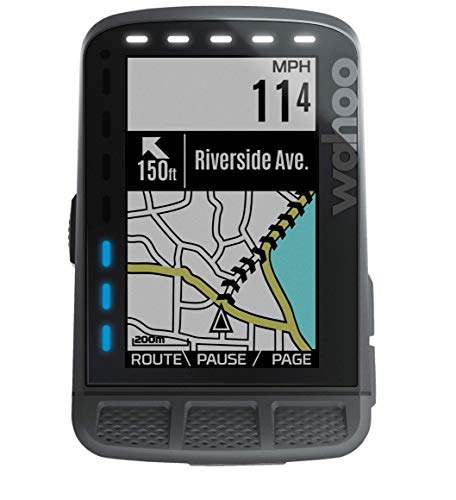
- Supports Komoot routes with automatic downloads and turn-by-turn guidance
- LEDs and audible cues make navigation easy to follow
- Includes training app integration, Strava Live Segments, and radar support
Best For: Riders needing reliable Komoot navigation for longer rides and training
Touch-Control Ride Hub
Wahoo ELEMNT ACE Cycling Computer

- Large 3.8-inch display with press, pinch, and swipe control
- Ready-To-Ride dashboard streamlines pre-ride setup
- Pressure sensor adds live AirBoost and AirDrag metrics
Best For: Riders wanting a large, easy-to-control computer with app-based management
Off-Road Navigation Pick
iGPSPORT BSC300T GPS Bike Computer
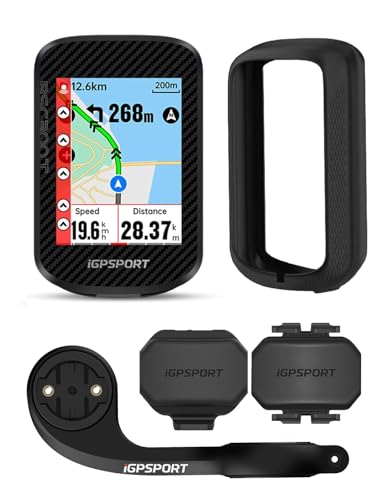
- Supports Komoot sharing via the iGPSPORT app
- Offline maps with turn prompts and off-course warnings
- Includes cadence and speed sensors in the box
Best For: Riders who want a touchscreen GPS computer with offline maps and Komoot syncing
Premium Route Sharing Pick
Wahoo ELEMNT ROAM V3 GPS Cycling Computer

- Imports routes from Komoot, Strava, GPX, and TCX
- Dual-band GPS for more reliable positioning
- 25-hour battery life with IPX7 water resistance
Best For: Riders who want easy Komoot route import and dependable navigation
Value Navigation Pick
iGPSPORT BSC200S GPS Bike Computer

- Imports routes from Komoot, Strava, and Ride With GPS
- One-touch navigation with back-to-start support
- 25-hour battery life and fast Type-C charging
Best For: Budget-conscious riders who want Komoot route import and long battery life
Fast Navigation All-Rounder
MEILAN Navihood L1 GPS Bike Computer with Offline Maps

- 5-second GPS hot start with 5 satellite systems
- Offline waypoint navigation with route sharing
- Syncs data to komoot, Strava, and TrainingPeaks
Best For: Route-focused riders who want quick GPS lock and app-based navigation
Color Screen Route Guide
GEOID CC700 2.8" GPS Bike Computer

- 2.8-inch color screen with turn reminders
- GPX route upload plus automatic rerouting
- WiFi, Bluetooth, and ANT+ connectivity
Best For: Cyclists who want a bright display and easy route navigation
Touchscreen Endurance Pick
COOSPO CS600 Color GPS Bike Computer

- 2.4-inch color touchscreen with auto-backlight
- 36-hour battery life with Type-C charging
- Route uploads plus breadcrumb navigation
Best For: Riders who want a long-lasting touchscreen GPS computer
Compact Route-Ready Navigation – Wahoo ELEMNT Bolt V3 GPS Cycling/Bike Computer
If you want bike computers with komoot support in a compact setup, the Wahoo ELEMNT Bolt V3 is built around automatic route handling and clear on-device navigation. It imports routes from Komoot, Strava, Ride with GPS, GPX, and TCX files, then gives turn-by-turn prompts with LEDs and audible cues so you can stay focused on the ride.
Best For: Riders who want a compact GPS computer with automatic Komoot route sync and straightforward turn-by-turn guidance.
Pros:
- Imports routes from Komoot and other major route platforms.
- Automatic route downloads and workout uploads when synced with compatible accounts.
- On-device route generation lets you create directions directly from the unit or companion app.
- Smart notifications, LiveTrack, and ANT+ radar integration add everyday ride convenience.
Cons:
- Smaller 2.3-inch LCD display than premium large-screen models.
- Navigation is button-based rather than touchscreen-based.
- Battery life tops out at 20 hours, which is modest for ultra-endurance use.
Overall, the Bolt V3 is a practical pick if your priority is reliable Komoot route syncing in a lighter, simpler computer. It focuses on navigation, connectivity, and ride alerts without adding extra complexity.
Premium Touchscreen Navigator – Garmin Edge 1050 Premium Cycling Computer
For riders comparing bike computers with komoot and looking for a premium screen-driven experience, the Garmin Edge 1050 stands out for its vivid color touchscreen and strong navigation features. It lets you create courses on the device, view road surface details on the map, and stay aware on the road with hazard alerts, messaging, and incident detection when paired with a compatible smartphone.
Best For: Cyclists who want a high-end touchscreen computer for navigation, training, and connected ride features.
Pros:
- Large 3.5-inch vivid touchscreen makes planning and riding easier to manage.
- Create courses directly on the device and see road surface type on the map.
- Up to 60 hours of battery life in battery saver mode.
- Includes speaker prompts, Garmin Pay, and advanced training tools like ClimbPro and power guide.
Cons:
- Heavier and larger than compact bike computers.
- Komoot integration is not listed in the supplied notes.
- Premium feature set may be more than casual riders need.
The Edge 1050 is the most feature-rich option here, especially if you want a touchscreen interface and broad navigation and training tools. It is best suited to riders who value a premium riding dashboard over a minimalist setup.
Long-Route Komoot Navigator – ELEMNT ROAM V1 GPS Bike Computer
If you are shopping for bike computers with komoot support and want a model made for longer rides, the Wahoo ELEMNT ROAM V1 is built around guided navigation and route syncing. It automatically downloads routes from Komoot and other platforms, then provides turn-by-turn prompts, LED cues, and audible alerts so you can follow a route without staring at the screen.
Best For: Riders who want dependable Komoot route support plus training, segment, and radar features for bigger days in the saddle.
Pros:
- Automatically downloads Komoot routes and supports multiple route file types.
- Turn-by-turn navigation with LEDs and audible cues keeps directions easy to follow.
- Training app integration includes TrainerRoad, TrainingPeaks, and Today’s Plan.
- Extra ride tools include Strava Live Segments, custom alerts, and ANT+ radar support.
Cons:
- Older V1 hardware lacks the newest display and interface refinements.
- Navigation is based on buttons rather than a touchscreen.
- Feature-rich setup may feel more complex than a basic GPS computer.
The ROAM V1 remains a strong choice if Komoot routing is central to how you ride and you also want useful training integrations. It balances navigation, alerts, and performance features in a proven package.
Touch-Control Ride Hub – Wahoo ELEMNT ACE Cycling Computer
The Wahoo ELEMNT ACE is a larger, modern option for riders who want bike computers with komoot-like route control and an easy touchscreen-style interface. Its strength is the detailed map and metric display, plus press, pinch, and swipe controls that make it simple to interact with the computer while riding or planning from the Ready-To-Ride dashboard.
Best For: Riders who want a large, easy-to-control cycling computer with strong visibility and app-based ride management.
Pros:
- Large 3.8-inch display with press, pinch, and swipe control options.
- Ready-To-Ride dashboard helps reduce setup time before each ride.
- Pressure sensor provides live AirBoost and AirDrag metrics for aero awareness.
- Syncs with the Wahoo app for centralized ride personalization and control.
Cons:
- At 208 g, it is heavier than more compact bike computers.
- The supplied notes do not list Komoot support specifically.
- Feature focus is more on ride control and aero data than lightweight simplicity.
The ACE is best viewed as a high-visibility command center for riders who want lots of screen space and app integration. If your priority is advanced control and big-screen readability, it is a compelling choice.
Off-Road Navigation Pick – iGPSPORT BSC300T GPS Bike Computer
If you want bike computers with komoot support that can handle navigation and training data in one unit, the iGPSPORT BSC300T is built for that job. It supports route import and data sharing to Komoot through the iGPSPORT app, while also adding offline maps, turn prompts, and off-course alerts for longer rides.
Best For: Riders who want a touchscreen GPS computer with offline maps, sensor support, and Komoot syncing.
Pros:
- Supports Komoot sharing through the iGPSPORT app, plus Strava sharing
- Offline map navigation with route preview, turn prompts, and off-course warning
- Includes cadence and speed sensors in the box
- Works with ANT+ and Bluetooth 5.0 devices, including e-bike and trainer gear
Cons:
- Smaller 2.4-inch screen than some premium navigation units
- Uses touchscreen plus six buttons, which may take a little getting used to
- Battery life is rated at 20 hours, lower than some competitors
Overall, the BSC300T is a strong fit if you care most about navigation features and broad device compatibility. The offline maps and Komoot-related workflow make it especially practical for route-focused riding.
Premium Route Sharing Pick – Wahoo ELEMNT ROAM V3 GPS Cycling Computer
For riders comparing bike computers with komoot, the Wahoo ELEMNT ROAM V3 stands out for route importing and turn-by-turn navigation. It can pull routes from Komoot, Ride With GPS, Strava, GPX, and TCX files, and its dual-band GPS is designed for more reliable positioning in forests and dense city environments.
Best For: Riders who want a polished navigation-focused computer with easy route import from Komoot and other sources.
Pros:
- Imports routes from Komoot, Strava, Ride With GPS, GPX, and TCX
- Dual-band GPS for better accuracy in challenging environments
- Offers turn-by-turn prompts and on-demand route generation
- 25-hour battery life and IPX7 water resistance
Cons:
- Pricier than entry-level bike computers
- Uses a smaller 2.8-inch display than some larger-map models
- Included components are focused on the unit and mounts, not extra sensors
The ROAM V3 is a good choice if you want a refined, app-friendly navigation experience. Its Komoot route support and strong GPS positioning make it well suited to riders who frequently follow planned routes.
Value Navigation Pick – iGPSPORT BSC200S GPS Bike Computer
The iGPSPORT BSC200S is a practical option if you want bike computers with komoot support without moving up to a premium price tier. It can import routes from Komoot through the iGPSPORT app, supports one-touch navigation, and adds turn reminders plus back-to-start guidance for everyday route following.
Best For: Budget-conscious riders who want Komoot route import, clear navigation, and long battery life.
Pros:
- Imports routes from Komoot, Strava, and Ride With GPS
- One-touch navigation and back-to-start support
- 25-hour battery life with a fast Type-C charge
- Works with iGPSPORT front lights and radar light
Cons:
- Type-C cable is not included in the box
- Buttons-only control may feel less modern than a touchscreen
- Display is 2.4 inches, so map viewing is more compact
For the money, the BSC200S covers the essentials well: route import, navigation reminders, and a solid battery. It is a sensible pick if you mainly want dependable Komoot-based riding guidance without extra frills.
Fast Navigation All-Rounder – MEILAN Navihood L1 GPS Bike Computer with Offline Maps
If you want bike computers with komoot-style route planning and easy route sharing, the MEILAN Navihood L1 is built for riders who care about navigation as much as ride data. It supports offline waypoint navigation, route sharing, and route uploads/syncing through the Navihood app, with compatibility for komoot alongside Strava and TrainingPeaks.
Best For: Riders who want fast GPS pickup, offline navigation, and broad sensor support in one unit.
Pros:
- 5-second hot-start positioning using GPS, GLONASS, GALILEO, BeiDou, and QZSS.
- Offline waypoint navigation with up to 30 waypoints and route sharing through the app.
- Supports uploads/syncing to komoot, Strava, TrainingPeaks, and the Navihood community.
- Works with speed, cadence, heart rate, power, Core temperature sensors, and Shimano Di2 via Bluetooth or ANT+.
Cons:
- 2.6-inch screen is smaller than some color-screen rivals.
- Navigation features are centered on the Navihood app workflow.
This is a strong pick if you want a compact GPS computer that balances guided navigation with training features and broad accessory compatibility. Its komoot sync support makes it especially appealing for route-focused riders who still want a practical workout device.
Color Screen Route Guide – GEOID CC700 2.8" GPS Bike Computer
For riders comparing bike computers with komoot-friendly workflow, the GEOID CC700 stands out for colorful route navigation, GPX import through the phone app, and auto sync with training platforms. Its 2.8-inch color screen and reroute planning make it a practical option for following routes without fuss.
Best For: Cyclists who want a bright display, easy route following, and wireless syncing.
Pros:
- 2.8-inch color screen with durable Asahi glass and three-button control.
- Route navigation includes turn reminders, zooming, pop-up alerts, and automatic rerouting.
- WiFi and Bluetooth support quick sync, firmware updates, and AGNSS data transfer.
- Supports up to 9 device types and exports FIT files for Strava and TrainingPeaks.
Cons:
- Navigation depends on GPX upload via the phone app for external routes.
- Battery life is not listed in the supplied details.
The CC700 is a well-rounded choice if you want visual route guidance without moving into a more expensive ecosystem. Its color display and rerouting support make it especially useful for riders who regularly load planned routes and want dependable on-ride prompts.
Touchscreen Endurance Pick – COOSPO CS600 Color GPS Bike Computer
If you’re looking for bike computers with komoot-style route support and long battery life, the COOSPO CS600 is designed for riders who want a touchscreen, navigation, and deep training data in one package. It supports route uploads and breadcrumb navigation, plus automatic syncing through the COOSPORIDE app to Strava and TrainingPeaks.
Best For: Riders who want a touch-friendly GPS computer with long battery life and broad ecosystem support.
Pros:
- 2.4-inch color touchscreen with auto-backlight for easier viewing in changing light.
- Built-in route navigation with uploaded routes or breadcrumb trail guidance.
- 36-hour battery life and 2-hour Type-C charging for longer rides.
- Supports smart bike lights, radar taillights, e-bikes, electronic shifters, and indoor trainers.
Cons:
- Does not include extra sensors or extension mounts in the box.
- Cadence, heart rate, and power tracking require separately sold accessories.
The CS600 is a practical pick for riders who want a modern interface and endurance first. Its combination of touchscreen navigation, long runtime, and ecosystem compatibility makes it a versatile option for both road and training use.
How We Picked These Bike Computers with Komoot
We focused on devices that make route import and navigation practical in real-world riding. Priority went to clear displays, reliable GPS performance, smartphone sync, ANT+/Bluetooth connectivity, waterproofing, and compatibility with Komoot-based route workflows.
We also considered ease of use, map handling, battery expectations, and whether the computer suits road, gravel, touring, or e-bike riders.
Quick Comparison: What Matters Most
If you want the simplest setup, choose a computer that pairs quickly with your phone and handles turn-by-turn navigation with minimal fuss. If you ride long distances or in new areas often, mapping quality and rerouting are more important than advanced training metrics.
For performance-focused riders, sensor support and data screens matter more. For adventure and commuting use, route clarity, off-course alerts, and sunlight visibility usually outweigh extra analytics.
Key Buying Factors for Bike Computers with Komoot
Navigation and Route Handling
Look for dependable turn prompts, clear off-course guidance, and fast rerouting. Offline maps are a big advantage if you ride in areas with weak signal or want fewer distractions.
Display and Usability
A larger, brighter screen can make a major difference when following Komoot routes in traffic, rain, or direct sun. Touchscreens are convenient, but physical controls can be easier with gloves or wet hands.
Battery Life and Water Resistance
Long rides and bikepacking trips demand strong battery life. At minimum, choose a unit with solid all-day endurance and IPX7-level protection if you ride in mixed weather.
Connectivity and Data Sync
Bluetooth and ANT+ support help you connect heart rate straps, power meters, cadence sensors, and phones. Wi-Fi sync is useful if you want quick route updates without repeated cable connections.
Who Should Buy Which Bike Computers with Komoot?
Road riders who want a polished, premium experience should prioritize high-end units with vivid displays and smooth navigation. Gravel riders and tourers should lean toward models with offline maps, rerouting, and strong battery performance.
If you’re budget-conscious, several lower-cost Bike Computers with Komoot still offer route guidance, wireless connectivity, and basic navigation that works well for commuting and weekend rides. E-bike riders should also check compatibility and screen readability before buying.
The best choice is the one that matches how you actually ride: simple route following, serious training, or full navigation for long adventures. With the right computer, Komoot becomes much more useful on the bike.